Many WordPress table plugins start struggling once datasets grow beyond a few thousand rows. Pages become slow, browsers begin to lag, and simple actions like sorting or filtering turn into heavy database queries that impact the entire site’s performance.
At the same time, many businesses need to display and manage large amounts of data inside WordPress, whether it’s financial reports, analytics logs, product catalogs, or research datasets containing hundreds of thousands or even millions of records.
This is the type of challenge wpDataTables was designed to solve. Instead of loading the entire dataset at once, it relies on server-side processing, smart caching, optimized rendering, and flexible database integrations to keep large tables fast, responsive, and easy to work with.
In this article, we’ll explore how wpDataTables handles large datasets without slowing down WordPress.
Table of Contents
Why Large Data Tables Break Most WordPress Sites
Large data tables create performance problems on many WordPress sites because of how the data is loaded and rendered. Many table plugins send the entire dataset to the browser at once, even when the user only needs to see a small portion of it.
When a table contains hundreds of thousands of rows, this approach quickly runs into browser memory limits. The browser must store the entire dataset and render every row in the page’s HTML structure. This leads to extremely heavy DOM rendering, which slows down the interface and makes basic actions like scrolling, sorting, or filtering feel sluggish.
Database performance can also become a bottleneck. Large queries that try to retrieve the full dataset at once can take significant time to execute, especially when combined with sorting or filtering operations. Even pagination can become inefficient if the database still processes the entire dataset behind the scenes.
The result is a familiar set of problems: long loading times, frozen interfaces, and dashboards that become difficult or impossible to use.
But, wpDataTables handles large data sets a bit differently – it avoids loading everything at once and instead focuses on retrieving only the data that is actually needed.
Server-Side Processing: Only Load What’s Needed
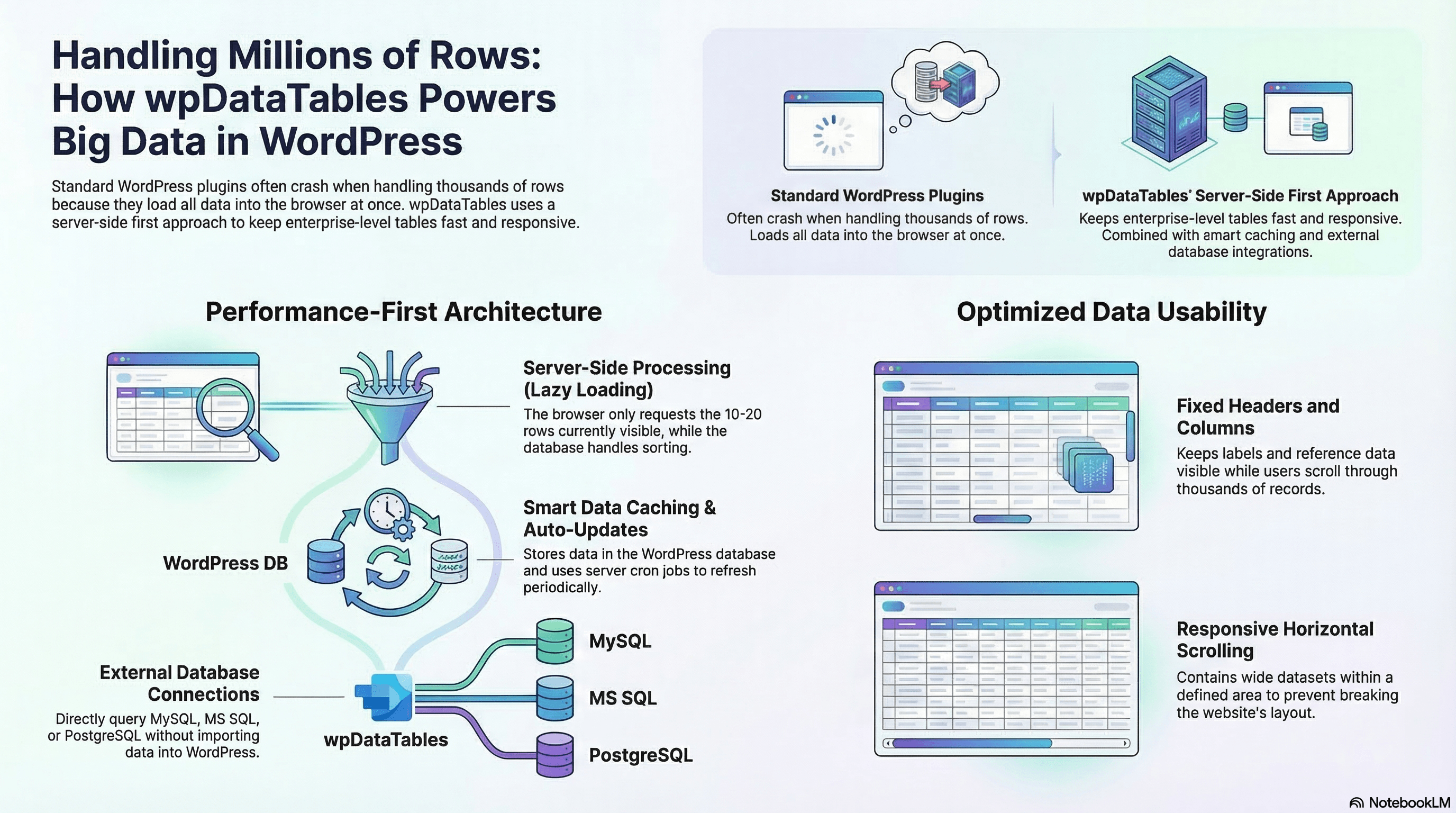
A key feature that allows wpDataTables to work with very large datasets is server-side processing, sometimes referred to as lazy loading. Instead of sending the entire table to the browser, all data operations are handled directly by the database server.
In a typical table setup without server-side processing, the plugin loads the full dataset into the page first. After that, pagination, filtering, and sorting are handled in the visitor’s browser using JavaScript. This approach works well for small tables, but performance quickly degrades as the dataset grows. Large tables increase page size, slow down loading times, and make actions like sorting or searching noticeably slower.
Server-side processing works differently. The data remains in the database, and wpDataTables requests only the rows needed for the current page view. If a table is configured to display 10 or 20 rows per page, only those rows are queried from the database. When a user switches pages, sorts a column, or applies a filter, an AJAX request is sent to the server. The database processes the request and returns just the relevant rows.
This means that even if a dataset contains hundreds of thousands or millions of records, the browser only works with a small portion of that data at any given moment. The database handles the heavy operations such as sorting and filtering, which it is designed to do efficiently.
As a result, page loads remain fast, browser memory usage stays low, and large datasets can be explored smoothly without overwhelming the WordPress site or the user’s device.
Smart Data Caching for Faster Table Performance
Large tables often rely on external data sources such as CSV files, Excel spreadsheets, Google Sheets, or APIs. If the table pulls fresh data from the source every time a page loads, the database and server must repeat the same heavy query again and again, which can quickly slow down performance.
wpDataTables solves this with data caching. When caching is enabled, the plugin stores the table data in the WordPress database after the first load. On subsequent page visits, the table is populated directly from the cached data instead of requesting the source file again. This significantly reduces repeated queries and helps large tables load much faster.
To keep cached tables accurate, wpDataTables also supports Auto-Update Cache. This feature allows the cache to refresh automatically at defined intervals using a server cron job. When the underlying data source changes, the cache is rebuilt so the table continues to display up-to-date information while maintaining fast load times.
This combination of caching and automatic updates is especially valuable for frequently accessed datasets such as analytics dashboards, reporting tables, or data pulled from APIs, where performance and data freshness both matter.
Scrollable Tables That Don’t Break the Layout
Large datasets often come with many columns, which can easily exceed the available screen space. When a table becomes wider than the page layout allows, it can stretch the entire page, break the design, or make the data difficult to read.
wpDataTables addresses this with the Scrollable feature, which allows tables to support horizontal scrolling while staying within a defined display area. Instead of expanding beyond the layout, the table remains contained and users can scroll horizontally to view additional columns.
This is especially useful for wide datasets such as financial reports, analytics tables, or comparison charts where multiple columns need to be visible but the page layout must remain structured. Horizontal scrolling keeps the table usable without forcing the entire page to expand.
The feature can be enabled directly in the table settings by turning on the Scrollable option in the Display tab. Once activated, the table becomes scrollable within its container, allowing users to navigate large tables smoothly while the surrounding layout stays intact.
By allowing tables to scroll inside a fixed space, wpDataTables helps maintain cleaner page layouts, improves navigation through large datasets, and creates a more usable interface for dashboards and data-heavy pages.
You can also learn how to create an HTML table with a fixed header and a scrollable body in this step-by-step guide.
Fixed Headers: Always Keep Column Labels Visible
Large datasets often require extensive vertical scrolling, especially when a table contains hundreds or thousands of rows. As users move down the table, it becomes easy to lose track of which column represents which data point.
The Fixed Header feature in wpDataTables solves this by keeping the table header visible while users scroll through the data. Once the table reaches the top of the viewport, the header row stays pinned in place so column labels remain visible at all times.
This is particularly useful when working with long reports, analytics dashboards, or financial tables where users frequently compare values across multiple rows. With column labels always visible, the data remains easier to interpret even during long scroll sessions.
With headers remaining aligned with the table columns and visible while scrolling, wpDataTables improves readability, simplifies data analysis, and makes large tables easier to work with inside WordPress.
Fixed Columns for Large Data Comparisons
Large datasets often contain many columns, which makes horizontal scrolling necessary to view all the information. While scrolling helps access additional columns, it can also make it difficult to keep important reference data in view.
The Fixed Columns feature in wpDataTables solves this by allowing selected columns to stay visible while the rest of the table scrolls horizontally. You can choose how many columns should remain fixed on the left or right side of the table, while the remaining columns stay scrollable.
This makes it much easier to maintain context when reviewing wide datasets. Key information such as item names, categories, or identifiers can remain visible while users browse the rest of the data.
Fixed columns are particularly useful in tables such as financial reports, product comparison tables, or analytics dashboards where users frequently compare values across many columns.
With important reference columns fixed in place, wpDataTables makes it easier to navigate large tables and analyze complex datasets without losing track of the data being reviewed.
Don’t miss out, learn how to make large tables easy to read with fixed headers and columns!
Connecting to Multiple Database Engines
In many advanced projects, important data does not live inside the WordPress database. It may be stored in external systems, enterprise databases, or separate servers that power analytics and reporting platforms.
To support these scenarios, wpDataTables includes multiple database engine connection support. The plugin allows you to create separate database connections and assign them to individual tables. This means each table can pull data from a different database or even from a different server than the one hosting your WordPress site.
wpDataTables supports connections to several popular database engines, including MySQL, Microsoft SQL Server, and PostgreSQL. Once a connection is configured, the plugin can query the external database and display the results in interactive tables directly inside WordPress.
This flexibility allows developers to connect WordPress tables to external systems, visualize enterprise datasets, and integrate data from analytics or reporting tools without importing large datasets into the WordPress database.
Instead of duplicating data, wpDataTables can work directly with existing databases, making it easier to integrate WordPress with larger data infrastructures and complex data workflows.
Why wpDataTables Is Built for Large-Scale Data
Handling large datasets inside WordPress requires more than just displaying rows in a table. It requires an architecture that can manage how data is processed, delivered, and presented without overwhelming the browser or the server.
wpDataTables approaches this challenge through a combination of performance-focused features. Server-side processing ensures that only the necessary rows are loaded at any given moment, allowing even very large datasets to be explored without sending the entire table to the browser. Data caching reduces the need to repeatedly run heavy queries, helping tables load faster and reducing the load on the database.
At the same time, usability features keep large tables manageable for users. Scrollable tables allow wide datasets to fit within the page layout without breaking the design, while fixed headers and columns help users maintain context when navigating through long tables or comparing values across many columns.
For more advanced use cases, multiple database connections make it possible to pull data directly from external systems such as MySQL, PostgreSQL, or Microsoft SQL Server, enabling WordPress to work with enterprise-level datasets.
Together, these capabilities allow wpDataTables to handle large-scale data in a way that goes far beyond basic table plugins. Instead of relying on custom-built applications, teams can manage, visualize, and interact with massive datasets directly inside WordPress.
Closing Thoughts
Large datasets are no longer unusual. From analytics dashboards to financial reports, many WordPress websites need to work with hundreds of thousands or even millions of rows.
Without the right architecture, these datasets can quickly overwhelm both the browser and the server. Slow queries, heavy page loads, and unresponsive tables make large data difficult to manage and even harder to analyze.
wpDataTables addresses this challenge through a combination of server-side processing, smart caching, optimized table rendering, and flexible database connections. Together, these features allow WordPress to handle large datasets efficiently while keeping tables responsive and easy to use.
The result is a table solution that scales from smaller datasets to enterprise-level data visualization, all while remaining fully integrated within the WordPress environment.