The best WordPress plugins with MCP already register real site actions for an AI assistant to call, rather than replies for it to generate.
A WordPress plugin with MCP support is a plugin that exposes its own actions as callable tools through the Model Context Protocol.
wpDataTables, Amelia, and IvyForms carry that support furthest today, covering tables and charts, bookings, and forms.
WordPress supplies the registration layer itself, through the Abilities API and the official MCP Adapter, while Anthropic maintains the underlying protocol those tools connect to.
Anthropic’s own December 2025 announcement counted more than 10,000 active public MCP servers already running, a scale wpDataTables and Amelia both now sit inside.
Table of Contents
What Is a WordPress Plugin With MCP Support?
A WordPress plugin with MCP support is a plugin that exposes its own actions as callable tools through the Model Context Protocol.
An AI assistant calls those tools directly instead of guessing at a task from generic training data.
What sets it apart:
- The plugin registers real site actions, not just conversational answers
- An external or in-admin AI client, such as Claude Desktop or an agent like Angie, does the calling
- Every action still runs through the plugin’s own validation and permission checks
This is different from a plugin with a built-in AI chat panel, which answers questions but never executes a WordPress action on its own.
Three plugins carry this depth of MCP support today: wpDataTables, Amelia, and IvyForms.
How Does MCP Connect an AI Assistant to a WordPress Plugin?
MCP connects an AI assistant to a WordPress plugin by turning the plugin’s registered actions into callable tools at a dedicated server endpoint.
Anthropic introduced the Model Context Protocol in November 2024, and WordPress built two connected projects on top of it.
What Is the WordPress Abilities API?
Central capability registry:
- Lets a plugin describe what it can do in a machine readable format
- Gives each ability its own input schema and permission check
- Shipped as a WordPress core API with the WordPress 6.9 release
WordPress.org’s own project documentation confirms the Abilities PHP API became available as a core API as of the December 2, 2025 release.
What Is the WordPress MCP Adapter?
The WordPress Developer Blog introduced the official MCP Adapter on February 4, 2026, a few months after the Abilities API landed in core.
The adapter translates registered abilities into MCP tools at an endpoint that typically reads /wp-json/mcp/{plugin}-mcp-server.
WooCommerce already registers its store actions this way, giving an assistant access to product and order operations through that same shared adapter.
- Confirmed MCP clients on the other end include Claude Desktop, Claude Code, and Cursor
- Messages travel over JSON-RPC, the transport format MCP was built on
The original Automattic/wordpress-mcp plugin was archived once the adapter took over, a change dated January 19, 2026 on its GitHub repository.
What Credentials and Permissions Does MCP Require?
Every MCP connection to a WordPress plugin runs on a WordPress Application Password, not the account’s regular login password.
Access rules that apply everywhere:
- Each registered action checks for a specific WordPress capability, most often manage_options
- An Editor, Author, or Subscriber account gets rejected outright on admin-only integrations
- Some hosted and multi-client plugins use OAuth 2.0 or OAuth 2.1 instead of an Application Password
A connected AI assistant inherits the full access of whichever account authorizes it, nothing less and nothing more.
Treat that connecting account the same way you would treat a second full administrator on the site.
Best WordPress Plugins With MCP Support
Ten WordPress plugins currently ship real MCP support, ranging from single-feature integrations to full site coverage.
wpDataTables sits among the established WordPress table plugins that turn spreadsheet or database data into interactive grids, and it was one of the first in that category to register its own MCP server.
Key figures:
- wpDataTables exposes 23 actions across table creation, editing, charts, media, and settings (wpDataTables documentation, 2026)
- Amelia exposes 12 actions covering the full booking cycle from availability checks to cancellations (Amelia documentation, 2026)
- Easy MCP AI exposes 243 tools spanning core WordPress objects, plugin integrations, and SEO data (WordPress.org plugin directory, 2026)
Three of the plugins above cover one feature area in depth.
The rest connect an assistant to the whole site at once.
| Plugin | Category | MCP tool count | Enablement default |
|---|---|---|---|
| wpDataTables | Tables and charts | 23 actions | Self-registering |
| Amelia | Booking and scheduling | 12 actions | Self-registering |
| IvyForms | Forms and entries | 7 tool areas | Off, manual toggle |
| WPVibe | Site-wide | Varies by installed plugins | Self-registering |
| Easy MCP AI | Site-wide | 243 tools | Self-registering |
wpDataTables MCP Integration
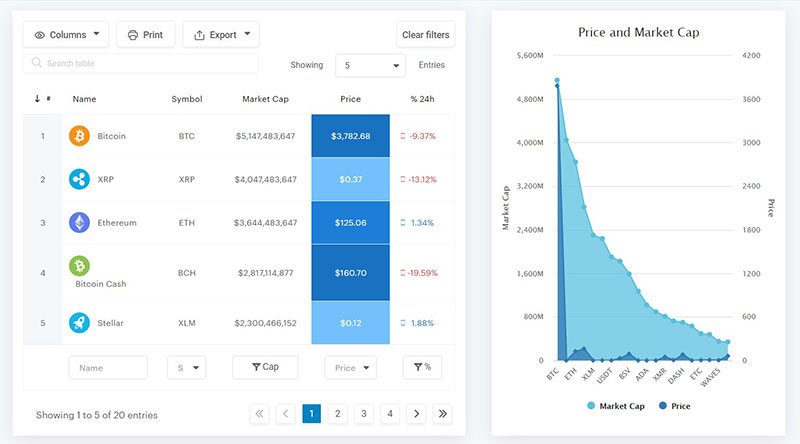
wpDataTables runs its own MCP server, giving a connected assistant 23 actions across table creation, editing, charts, media, and settings.
Every one of those actions carries its own permission and license check before it runs.
What the assistant can build:
- Live tables sourced from CSV, Excel, nested JSON, XML, or Google Sheets
- Charts built on an existing table, using one of four supported chart engines
- New tables generated directly from a read-only SQL SELECT query
The JSON source option works the same way as manually turning a JSON feed into an HTML table, just triggered by the assistant instead of the wizard.
Google Charts and Chart.js render on every license tier, while Highcharts and ApexCharts require the Standard plan or above.
Where it stops:
- No delete action exists anywhere in the integration
- Row-level editing is out of scope except on Simple tables, where cell content is part of the table definition itself
The SQL action only accepts a SELECT statement, and rejects INSERT, UPDATE, DELETE, DROP, and UNION before any of them reach the database.
Pros:
- 23 actions cover creation, editing, and charting in one integration
- The free tier already includes CSV, Excel, and SQL-based table creation
Cons:
- No delete action anywhere, and no bulk row editing on database-backed tables
- Google Sheets import, MySQL import, Highcharts, and ApexCharts all sit behind a paid tier
Amelia MCP Integration
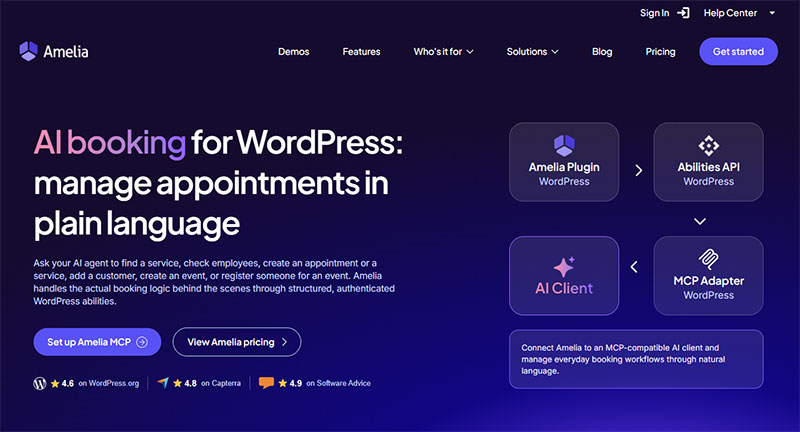
Amelia connects through an external package rather than a self-registering server, run with the @automattic/mcp-wordpress-remote command over npx.
That command points at Amelia’s own MCP endpoint once Node.js is installed on the machine running the AI client.
What the assistant can do:
- List services, employees, customers, events, and appointments
- Create a service, a customer, an appointment, or an event
- Check availability for a service and cancel an existing booking
Twelve actions cover that entire booking cycle, and every Amelia license plan gets access with no separate MCP feature toggle. The setup guide walks through the configuration step by step.
What it skips:
- Customer notifications do not fire for a booking an AI assistant creates
- New services and events fall back to default color, visibility, and deposit settings
Pros:
- Works on every pricing plan with no license gate
- Covers the full booking cycle end to end, from availability to cancellation
Cons:
- Setup needs Node.js and a command-line style configuration, not just a settings toggle
- No customer notification fires automatically after an AI-created booking
IvyForms MCP Integration
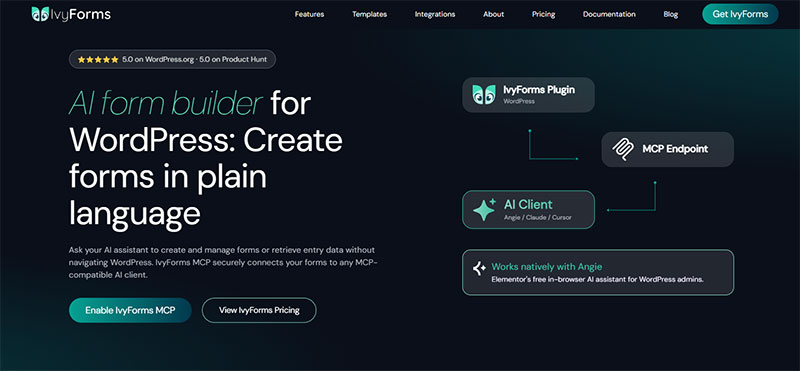
IvyForms keeps MCP switched off until an administrator turns it on manually under Settings, General.
That default is stricter than wpDataTables or Amelia, both of which register their MCP server automatically.
Coverage once enabled:
- Forms: list, open, create, duplicate, update settings, add or reorder fields
- Entries: list, summarize, count, star or unstar
- Notifications: list, view, create, update, duplicate, search
- Settings, templates, and integrations: read-only visibility
The main in-admin path runs through Angie, Elementor’s free AI agent, which calls IvyForms tools from inside the logged-in WordPress admin session.
An external client such as Claude Desktop or Cursor reaches the same tools through a separate, more technical connection.
Pros:
- Off by default, so a site owner opts in deliberately instead of inheriting the access automatically
- Wide coverage across forms, entries, and notifications once switched on
Cons:
- No delete tools for forms, entries, or notifications
- Submission data such as field values, IP addresses, and user agents comes back masked, even to an administrator’s own assistant
Which Plugins Add Site-Wide MCP Access Instead of a Single Feature?
A single-feature plugin like wpDataTables, Amelia, or IvyForms only exposes one part of a site.
A site-wide MCP plugin exposes core WordPress objects and other installed plugins through one connector instead.
- Angie: Elementor’s free in-admin AI agent, running inside the WordPress admin session instead of through an external client
- WPVibe: a standalone MCP server connecting Cursor, Windsurf, Claude Code, ChatGPT, or Claude to core WordPress objects and any Abilities API plugin
- Easy MCP AI: the largest tool count in this category, spanning core WordPress, plugin integrations, and SEO data connectors
- Royal MCP: a vendor-agnostic connector built for Claude, ChatGPT, Gemini, and coding IDEs through one shared endpoint
- AI Engine: Meow Apps’ plugin, which turns a site into its own MCP server and extends into WooCommerce and Polylang on its paid tier
- Novamira: built around five raw primitives (execute PHP, read or write files, edit files, delete or toggle, list directory) instead of a registered ability per action
Elementor, the page builder behind Angie, runs on 13% of all websites, according to W3Techs 2026 tracking data.
AI Engine has passed 100,000 active installs on its Pro tier, per Meow Apps’ own product listing.
Which WordPress Plugin With MCP Support Fits Your Use Case?
The right choice depends on what an assistant needs to touch, not on which plugin has the highest tool count.
| Site type | Best fit | Why |
|---|---|---|
| Reporting or pricing site | wpDataTables | MCP actions map directly to table and chart creation |
| Service business with bookings | Amelia | MCP actions cover the full cycle from availability to cancellation |
| Lead generation site | IvyForms | Deliberate opt-in keeps form and entry access closed by default |
| Agency managing many plugins | Site-wide connector | One endpoint instead of several single-feature integrations |
A site running mostly structured data, reports, dashboards, product pricing, gets more out of wpDataTables than out of a general-purpose connector.
A service business built around appointments gets more direct value from Amelia’s booking-specific actions than from a site-wide tool that treats bookings as an afterthought.
WordPress runs 41.2% of the web, which is exactly why agencies rarely manage just one site (W3Techs, 2026).
An agency juggling WooCommerce, ACF, and a dozen other plugins across client sites is usually better served by WPVibe, Easy MCP AI, or Royal MCP than by installing three or four single-feature MCP plugins side by side.
How Do You Connect an AI Assistant to a WordPress Plugin Through MCP?
The connection process is nearly identical across wpDataTables, Amelia, and IvyForms, with small differences in where the endpoint lives.
- Generate a WordPress Application Password from the connecting user’s profile instead of using that account’s login password
- Add the plugin’s MCP endpoint to the AI client’s MCP server configuration, using the exact path the plugin documents
- Save the configuration and restart the MCP client completely so it detects the new server entry
- Confirm the plugin’s tools appear in the client’s available tools list
- Test a read-only request first, such as listing tables, services, or forms
- Test a write action only after the read-only request returns correct data
Amelia’s setup adds one requirement most single-feature plugins skip: Node.js has to be installed on the machine running the AI client, since its connection runs through an npx command.
wpDataTables and IvyForms both register their MCP server directly, so the client only needs the endpoint URL and the application password to connect.
|
One MCP connection and a much bigger WordPress workflow wpDataTables doesn’t have to work alone. Amelia and IvyForms can also expose AI-ready capabilities, opening the door to workflows that move beyond a single plugin. The bigger idea?
All accessible to your AI workflow through the same MCP-based WordPress architecture. |
When Does MCP Support Not Help a WordPress Site, or Stop Working?
MCP support fails or adds nothing in a handful of predictable situations, and none of them are rare edge cases.
Where it breaks down:
- A host that strips the Authorization header before it reaches WordPress returns a raw 403 error regardless of correct credentials, a server configuration issue rather than a plugin bug
- A site with no administrator willing to authenticate the connection cannot use MCP at all, since every action checks for manage_options
- A host without Node.js available cannot run npx-based connections such as Amelia’s, and the client reports npx: command not found or spawn npx ENOENT
- A site owner who never opens an MCP-compatible AI client gets no benefit from an enabled endpoint, since nothing calls it
Some hosting environments block MCP traffic at the network level before it ever reaches a plugin’s own validation.
AI Engine’s own changelog documents a built-in connection test that detects host-level WAF blocks, including WP Engine’s default configuration, before the failure ever surfaces inside Claude.
A connected assistant inherits the full access of the administrator account it authenticates as.
A site should not connect MCP using an account its owner would not otherwise trust with full administrator access.
FAQ on WordPress Plugins With MCP
What Is the Difference Between an MCP-Enabled Plugin and a Generic AI Chatbot Plugin?
A chatbot plugin generates text from training data and stops there.
An MCP-enabled plugin calls the site’s own registered actions, so an assistant creates a table, books an appointment, or edits a form field instead of just describing how to.
Can a Non-Administrator Use MCP on a WordPress Site?
No. Every action across wpDataTables, Amelia, and IvyForms checks for the manage_options capability before it runs.
An Editor, Author, or Subscriber account gets rejected outright, even on a simple read-only request like listing tables or forms.
Is Angie the Same Thing as an MCP Server Plugin?
No. Angie is Elementor’s AI agent, and it calls tools through MCP rather than running its own MCP server.
IvyForms and other plugins register the actual server; Angie is one of several clients that connects to it.
What Causes an MCP Connection to Fail?
Three causes account for most failures: wrong credentials, a login password used instead of an application password, a host stripping the Authorization header, or a missing dependency like Node.js on npx-based setups such as Amelia’s.
Does Enabling MCP Slow Down a WordPress Site?
No measurable slowdown occurs from registering abilities.
The endpoint sits idle until an AI client sends a request, so a site with MCP enabled but no connected assistant behaves exactly like one without it.
Is MCP Access on a WordPress Plugin Safe to Leave Switched On?
It is only as safe as the account authorizing it.
Since a connected assistant inherits full administrator access, leaving MCP switched on with a weak or shared application password creates real risk, independent of the plugin itself.
What Should You Verify Before Trusting WordPress Plugins With MCP?
A WordPress plugin with MCP support earns real trust only when its permission model, tool count, and license gate line up with what a specific site needs, not when it simply advertises the highest number of actions available.
Three checks decide whether that fit exists, in a fixed order that matters more than the order most reviews suggest.
- Confirm which account authorizes the connection
- Test one read-only action before any write action
- Check the license tier only after access is confirmed
Choosing a self-registering plugin like wpDataTables or Amelia trades a manual enablement step for immediate access.
Choosing IvyForms’s manual toggle trades that convenience for deliberate control over when an assistant can act.
A reader ready to build that same structure by hand next benefits from a walkthrough on pulling data from a database straight into a WordPress page, the same source an MCP-enabled table draws from automatically.
With the MCP server enabled, you can create tables and charts with AI by describing what you need, and the assistant builds them from your CSV, Excel, nested JSON, XML, or Google Sheets data.