


Table of Contents
Integer columns display numeric values without decimals. When non-integer values appear in the source data, they are cast as integers, with non-numerical characters and decimals removed.
“Integer” columns are used when you need to render numeric values that do not contain a decimal. Even, if in the input data source you have non-integer values for this column (not just numbers, or numbers with a decimal), if you define a column as integer, it will cast and render all the values as integers, cut all non-numerical characters, and the decimals as well.
In the example hotel booking table, the “Stars” and “Price” columns are integer columns, showing values such as hotel ratings (1-5) and prices.
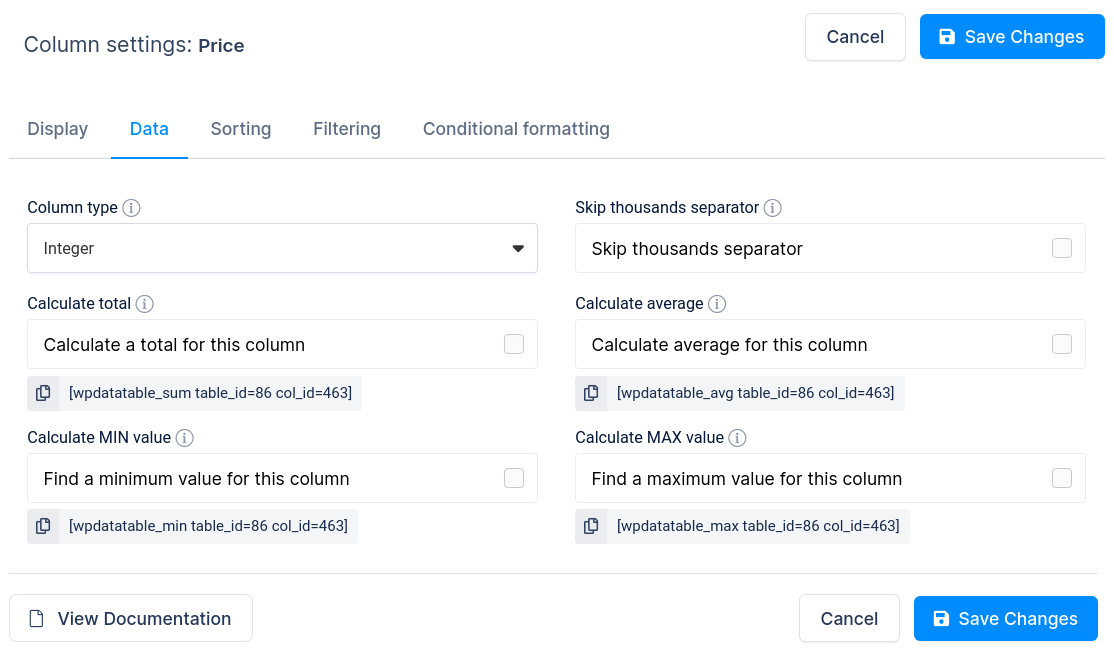
You can skip the thousands separator and enable footer calculations. The settings panel offers a “Skip thousands separator” checkbox for columns that should not use formatting — such as years, product SKUs, or vendor codes.
There are also four calculation features you can enable for “Integer” columns. You can tick these checkboxes to calculate desired functions (Sum, Average, Minimum, Maximum) for all values for a given column. These calculations will be rendered in the table footer, as you can see in the example above. See the “Calculation functions“ chapter of this documentation for detailed info.
To get your hands on wpDataTables Lite, please enter your email address below. We’ll send you a direct download link and keep you updated on existing features along with helpful tips and tricks!