


Table of Contents
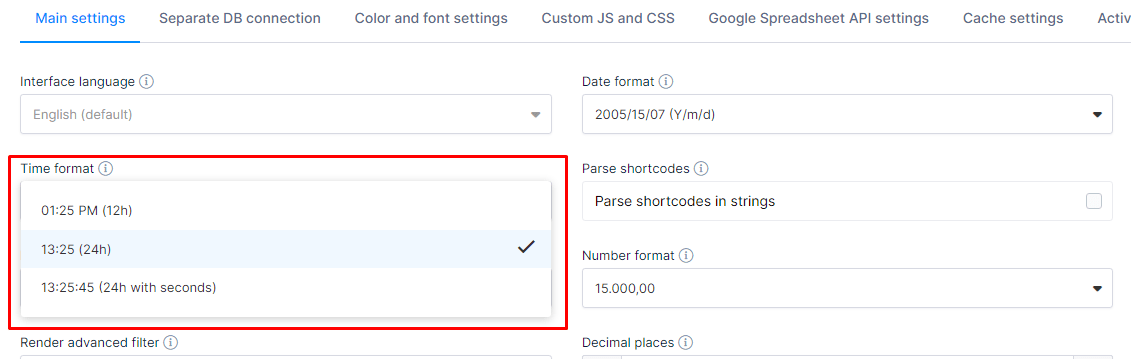
Time columns handle values that contain hours, minutes, and seconds, and format them according to your wpDataTables settings. Three format options are available: 1:25 PM (12-hour), 13:25 (24-hour), and 13:25:45 (24-hour with seconds).
In the example flight-arrival table, the “Arrival” column shows times in 12-hour format (for example, 06:13 AM), across 10 flight records with the columns ID, Flight, Carrier, Origin, Arrival, Terminal, and Status.
| wdt_ID | Flight | Carrier | Origin | Arrival | Term. | Status |
|---|---|---|---|---|---|---|
| 1 | AV 42 | AVIANCA | (MDE) Medellin | 06:13 AM | 4 | Landed Delayed |
| 2 | NH 7814 | ANA | (MDE) Medellin | 06:13 AM | 4 | Landed On-time |
| 3 | AS 18 | Alaska Airlines | (SEA) Seattle | 05:20 AM | 8 | Landed On-time |
| 4 | AA 7039 | American Airlines | (SEA) Seattle | 05:20 AM | 8 | Landed On-time |
| 5 | DL 2619 | Delta Air Lines | (LAS) Las Vegas | 05:45 AM | 4 | Landed On-time |
| 6 | KL 6649 | KLM | (LAS) Las Vegas | 05:45 AM | 4 | Landed On-time |
| 7 | VS 4770 | Virgin Atlantic | (LAS) Las Vegas | 05:45 AM | 4 | Landed On-time |
| 8 | JJ 8414 | LATAM Airlines Brasil | (GIG) Rio De Janeiro | 05:39 AM | 8 | Landed On-time |
| 9 | CX 7713 | Cathay Pacific | (GIG) Rio De Janeiro | 05:39 AM | 8 | Landed On-time |
| 10 | AA 974 | American Airlines | (GIG) Rio De Janeiro | 05:36 AM | 8 | Landed On-time |
| wdt_ID | Flight | Carrier | Origin | Arrival | Term. | Status |
To get your hands on wpDataTables Lite, please enter your email address below. We’ll send you a direct download link and keep you updated on existing features along with helpful tips and tricks!